


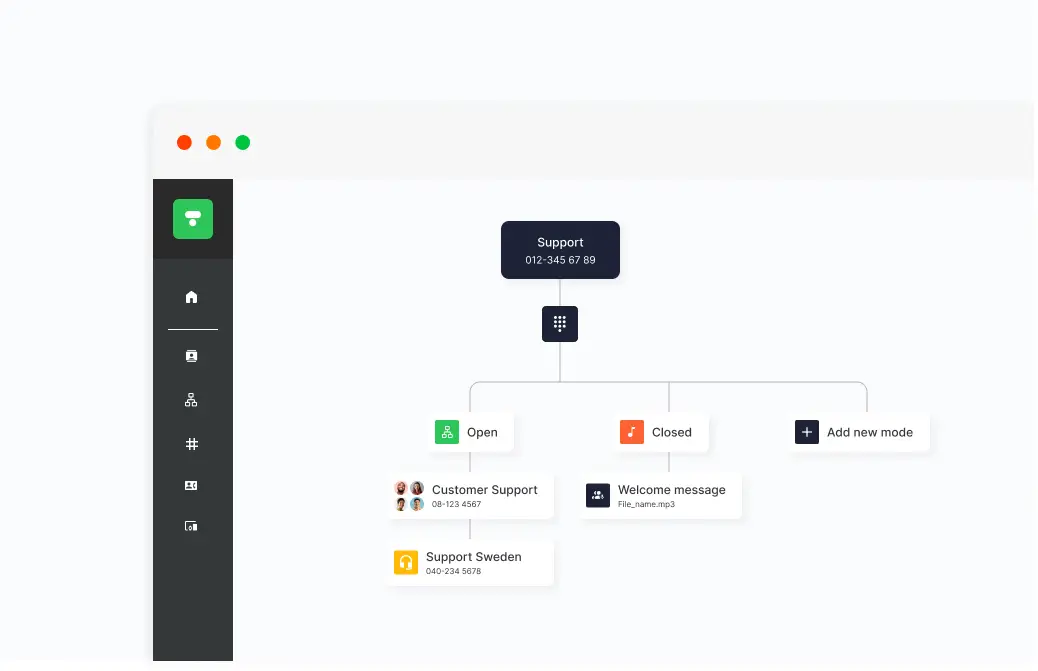
Plan opening hours, public holidays, vacation periods, and other special dates directly in the PBX. Create different PBX modes with custom messages and decide when each mode should apply, ensuring the PBX updates automatically.
When the workday changes, the PBX needs to keep up. With scheduling, you control both standard business hours and how the PBX operates during Easter, summer holidays, Christmas, or internal company events. Changes can be made in advance and tailored to how your business operates throughout the year.
Once the schedule is set, the correct PBX mode is activated automatically. When a customer calls, the message for the active mode plays, giving them the right information immediately or forwarding them to someone who can help. This provides a smoother workflow for your team and a more seamless experience for the customer.
How Schedule your PBX works
Create different PBX modes
In the Telavox Admin Portal, you can create PBX modes tailored to your needs—such as open, closed, vacation mode, summer closure, or open weekends. For each mode, you set opening hours and determine how incoming calls should be handled.
Make changes in bulk
With many queues or multiple PBXs, keeping track of everything can quickly become overwhelming. That is why you can manage services in your schedule in bulk and update multiple PBX modes at the same time, instead of editing each one manually.
Set your everyday schedule
Set up your company’s standard business hours and recurring weekly schedule. The PBX will then switch modes—for example, from open to closed—at the times you select. A weekly overview clearly displays the active opening hours.
Schedule holidays and special events
Link a PBX mode to a date or period in the calendar, either for a single day or as an annually recurring event. From the start date, the mode governs how calls are handled across the PBX, queues, or IVR menus. You don’t need to add public holidays manually; preconfigured holidays are available for each country and can repeat automatically every year.
Add messages for callers
Each PBX mode can have its own voice message or voice menu (IVR/key selection) providing details such as opening hours or when you will be available again. The message plays as soon as someone calls.
Tip! A smart way to display opening hours during holidays is to use the Chat widget on your website.
Customize how calls are handled
Depending on which PBX mode is active, calls can be routed to a queue, a group, or a voicemail. Scheduling can also be combined with employees’ personal status modes.
Combine with employee status
Scheduling in the PBX can be used together with employees’ personal status modes.
Get started
New customer? Curious about what Telavox PBX can do for your business? Contact us and we’ll tell you more.
Existing customer? Read more in our FAQ about bulk management of your PBX, scheduling special events or holidays, how to set opening hours in your PBX, and much more.


